 Propel
Pipeline Overview
The end-to-end Propel workflow: from user idea to validated implementation, with human checkpoints at every phase transition.
The Problem Propel Solves
An unconstrained LLM will skip straight to implementation when you say "implement X." Without guardrails, Claude fills in gaps with the mean of its training data — plausible-looking but often wrong implementations built from averaged patterns rather than project-specific knowledge.
Vague requests like "build a can transport task with robosuite" lead to implementations that look reasonable but silently diverge from what you actually need. Claude fills architectural gaps with defaults instead of asking. The result: hours of debugging code that was wrong from the start because the problem was never properly scoped.
Propel solves this by injecting a structured workflow into every Claude session — a pipeline of gates, questioners, investigations, and auditors that forces investigation before implementation and human approval before phase transitions.
End-to-End Flow
The complete Propel pipeline has 12 phases, connected by 5 gates and 2 questioner checkpoints:
User idea → Gate 0 → Q0 → Investigation → Gate 1 → Q1 → Design → Gate 2 → Implementation → Gate 3 (loop) → Validation → Debugging → Gate 4 → Training → RetrospectiveEach phase serves a distinct purpose in the pipeline:
| Phase | Purpose | Key Output |
|---|---|---|
| Intake | Scope the work with disjunctive questions | Confirmed scope statement |
| Gate 0 | Human approves scope before any work begins | Go/no-go decision |
| Questioner Q0 | Ground the work in concrete references | Reference sources, architecture patterns, benchmarks |
| Investigation | Trace code paths, document architecture, discover risks | Living scratch/ README with findings |
| Gate 1 | Human reviews findings, makes design decisions | Approved findings + design decisions |
| Questioner Q1 | Nail down implementation details | Binding implementation constraints |
| Design | Paper-to-code mapping, regression risk analysis | Component list with equation mappings |
| Gate 2 | Human reviews and approves implementation plan | Approved plan with scope estimate |
| Implementation | Build each component with auditor review | Implemented + audited components |
| Gate 3 | Per-component audit results presented to human | Clean pass or issue resolution |
| Validation | Shape, gradient, overfit, and regression gates | Validation evidence |
| Debugging | Root-cause analysis with evidence-backed diagnosis | Classified diagnosis (code bug / design issue / config) |
| Gate 4 | Human approves diagnosis before fix is applied | Approved fix plan |
| Training | Launch and monitor training runs | Training results |
| Retrospective | Capture learnings and failed attempts | Registry entry with failed attempts table |
Pipeline Diagram
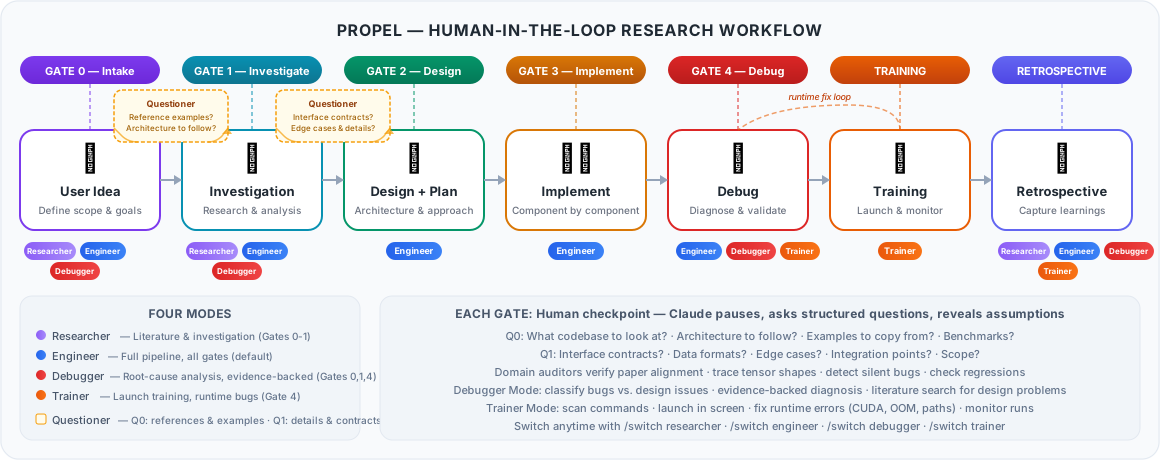
figures/figure_pipeline/make_pipeline.py.The text version below shows which phases are active in each mode. Filled blocks (█) indicate active phases; diamond blocks (◆) indicate questioner checkpoints:
                    Researcher          Engineer            Debugger            Trainer
                    ──────────          ────────            ────────            ───────
Gate 0  Intake      ██████████          ██████████          ██████████
                        |                   |                   |
  Q0    Questioner      ◆◆◆◆◆◆◆◆◆◆          ◆◆◆◆◆◆◆◆◆◆
        (grounding)     |                   |
        Investigation   ██████████          ██████████          ██████████
                        |                   |                   |
Gate 1  Post-Invest.    ██████████          ██████████          ██████████
                        |                   |                   |
  Q1    Questioner      ◆◆◆◆◆◆◆◆◆◆          ◆◆◆◆◆◆◆◆◆◆          |
        (details)                           |                   |
        Design                              ██████████          |
                                            |                   |
Gate 2  Post-Design                         ██████████          |
                                            |                   |
        Implementation                      ██████████          |
                                            |               ┌────┴─────┐
Gate 3  Mid-Impl.                           ██████████      | classify |
                                            |               | evidence |
        Validation                          ██████████      | lit srch |
                                                            └────┬─────┘
        Training                            ██████████           |         ┌──────────┐
                                            |                   |         | scan,    |
        Debugging                           ██████████          ██████████ | launch,  |
                                            |                   |         | monitor  |
Gate 4  Post-Debug                          ██████████          ██████████ └────┬─────┘
                                            |                   |              |
        Retrospective   ██████████          ██████████          ██████████ ██████████
                                                                          (runtime only)
Mode Filtering
Not every session uses the full pipeline. Propel's four modes filter which phases and gates are active, so you only engage the checkpoints relevant to your task.
Gates by Mode
| Gate / Questioner | Researcher | Engineer | Debugger | Trainer |
|---|---|---|---|---|
| Gate 0 (Intake) | Active | Active | Active | — |
| Q0 (Grounding) | Active | Active | — | — |
| Gate 1 (Post-Investigation) | Active | Active | Active | — |
| Q1 (Details) | Active | Active | — | — |
| Gate 2 (Post-Design) | — | Active | — | — |
| Gate 3 (Mid-Implementation) | — | Active | — | — |
| Gate 4 (Post-Debug) | — | Active | Active | Active (runtime only) |
Phases by Mode
| Phase | Researcher | Engineer | Debugger | Trainer |
|---|---|---|---|---|
| Intake | Active | Active | Active | — |
| Investigation | Active | Active | Active | — |
| Design | — | Active | — | — |
| Implementation | — | Active | — | — |
| Validation | — | Active | — | — |
| Training | — | Active | — | Active |
| Debugging | — | Active | Active | Active (runtime only) |
| Retrospective | Active | Active | Active | Active |
Researcher: Stays in the understanding phase — literature, investigation, and retrospective only. Engineer: Full pipeline with all phases and gates. Debugger: Focused on root-cause analysis with classify-evidence-diagnose protocol. Trainer: Skips to training execution, fixes runtime bugs only.
The Injection Mechanism
An unconstrained Claude will ignore the pipeline and skip to implementation. Propel prevents this through a hook-based injection system that loads the full workflow into Claude's context before it sees your first message.
How It Works
propel init
  ↓
Copies skills/, agents/, commands/, hooks/ into .claude/
Merges hook config into .claude/settings.local.json
  ↓
User starts `claude`
  ↓
SessionStart hook fires → runs session-start.sh
  ↓
Injects full using-propel/SKILL.md content as JSON into Claude's context
(Also injects: active investigations, project profile, registry entries)
  ↓
Claude's context now contains:
  1. Core principles (core/CORE.md — non-negotiable mindset rules)
  2. The gate protocol (5 mandatory gates)
  3. The skill routing table (which skill for which trigger)
  4. The auditor dispatch rules (which agent after which code change)
  5. Active investigation state (scratch/ READMEs)
  6. Project profile (.propel/profile.md, if it exists)
  7. Current mode + mode_selection_needed (.propel/mode.json)
  8. Empty repo flag (whether to use progressive CLAUDE.md building)
What Each Layer Provides
| Layer | What It Provides | How It Enters Context |
|---|---|---|
| Core principles | Non-negotiable mindset rules: evidence over agreement, anti-sycophancy, context discipline, self-reflection, loop-breaking | SessionStart hook injects core/CORE.md |
| SessionStart hook | Injects core + using-propel skill + investigation state on every session start, resume, and compaction | .claude/settings.local.json hooks config |
| PreCompact hook | Re-injects context before Claude compresses old messages, so instructions survive compaction | Same hook, different trigger |
| Skill descriptions | Claude Code loads all .claude/skills/*/SKILL.md descriptions — Claude matches triggers against user input | Built-in Claude Code feature |
| Agent descriptions | Claude Code loads all .claude/agents/*.md descriptions — Claude dispatches based on description match | Built-in Claude Code feature |
| CLAUDE.md | Project-level instructions read on every session | Built-in Claude Code feature |
| Project profile | .propel/profile.md — conventions Claude should follow silently | SessionStart hook reads it |
| Mode state | .propel/mode.json — controls which skills and gates are active | SessionStart hook reads it |
Redundant Constraint Layers
Propel's reliability comes from redundancy. No single layer is critical — if one fails, the others still constrain Claude. This is the difference between "please follow this process" and having the process embedded in every layer of context.
Skill description match  →  "activates before any action"
Hook injection           →  full routing table in context
CLAUDE.md                →  "This project uses the Propel research workflow"
Auditor dispatch rules   →  agents auto-run after code changes
The system is prompt-based, not mechanically enforced. There is no code-level gate that blocks Claude from skipping a step. Claude follows the workflow because:
- The hook injects the full routing table into context before Claude sees your first message
- The using-propel skill description says "activates before any action" — Claude Code's skill matching prioritizes this
- The instructions are specific and structured (routing tables, not vague guidelines)
- The PreCompact hook re-injects on compaction, so instructions survive long sessions
Very long sessions where context is heavily compressed (the PreCompact hook mitigates this). If the user explicitly says "skip the gates." Ambiguous requests that don't clearly match any routing table trigger. If Claude skips a gate, say: "You skipped Gate 0 — go back and ask scoping questions." Claude will see the instructions in its context and correct.